In this guide 11 sections
- The short answer
- 1. Scheduling: Google Calendar
- 2. Tracking who owes what: Google Sheets
- 3. Invoicing: Invoiless or Zoho Invoice
- 4. Accounting: Zoho Books, Xero or QuickBooks
- 5. All-in-one lawn care software
- 6. Quoting: Google Maps and my free calculators
- 7. Texting customers
- 8. Getting found: Google and your website
- Side by side
- Frequently asked questions
Every week someone in my Facebook group asks which app they should use to run their lawn business. Most of the answers are the name of whatever software the person replying pays for. That is not much help when you have eight lawns and a second-hand mower.
I have been mowing since 1992 and built three lawn businesses from scratch. I have run a round on a magnet board, a Casio organiser, a Palm Pilot and a giant Excel file. The Casio went into a rubbish compactor with my client list on it, and I spent a week rebuilding about 75% of it from memory and door-knocking. So I care a lot about what goes on my phone.
This is what I use and what I would tell a new lawn guy to use. Some of it is free. Some of it is mine, and I will say so when it is. Prices are in USD and were checked in September 2026.
The short answer
- Just starting: Google Calendar, Google Sheets and a free invoicing app. Total cost: nothing.
- Doing the books: Zoho Books is free until you turn over $50,000 a year.
- Running a crew: this is when paid lawn care software like Jobber or QuoteIQ starts to earn its money.
- Want more lawns: no app fixes that. A Google Business Profile and a website that makes the phone ring does.
Don’t fall into the trap of thinking software will solve everything. It won’t. The right simple tools just stop you drowning in admin and forgetting who is due when.
1. Scheduling: Google Calendar
Price: free.
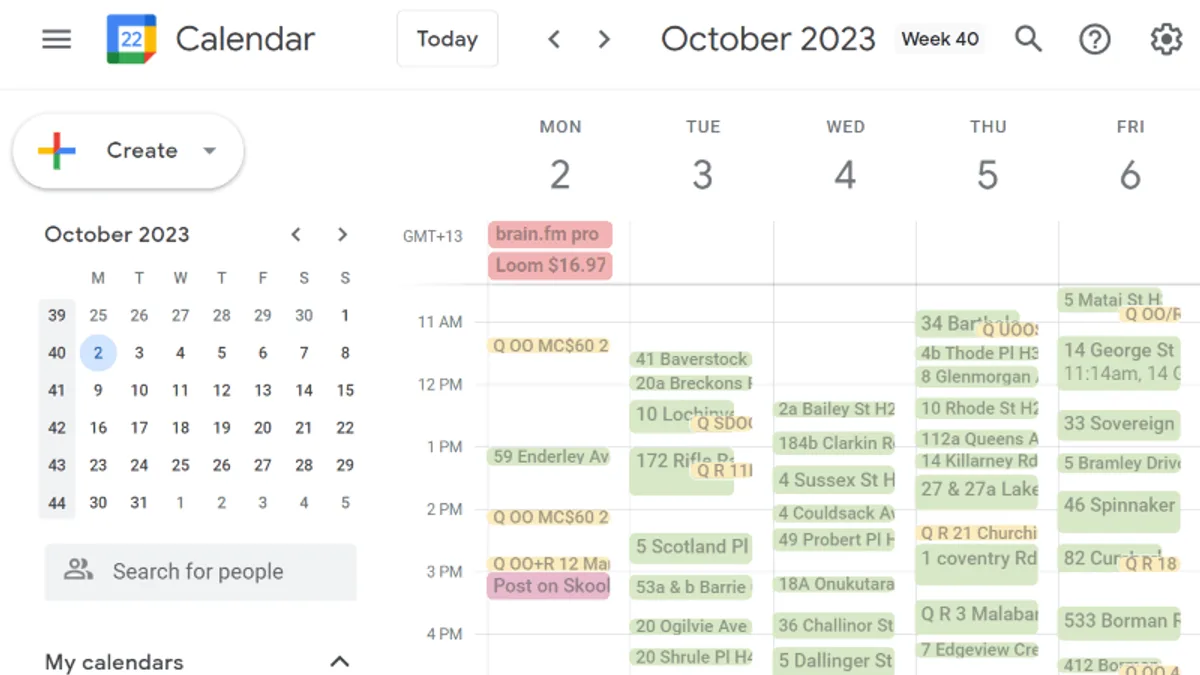
I run about half my business on Google Calendar. Each lawn is an appointment. I add notes like the gate code or the dog, set it to repeat every two weeks, and drag it to another day when it rains. It is on the computer at home and on my phone on the job, and they always match.
Good: free, dead simple, and you already have it if you have a Gmail address.
Watch for: it does not know what anything costs or who has paid. That is what the next one is for.
Do today: put every regular lawn in as a repeating appointment, with the address in the location box. Tap the address on the day and your phone gives you directions.
2. Tracking who owes what: Google Sheets
Price: free.
Google Sheets is a free spreadsheet that lives on your phone and your computer. One row per customer: name, address, price, how long the lawn takes, and whether they have paid.
That last column matters more than any app. My rule is simple. Never let the total you are owed go over one week’s income. A sheet shows you that number at a glance.
The time column matters too. Divide the price by the minutes and you find out which lawns are paying you and which are costing you. I ran 450 lawns off a spreadsheet with a traffic light system built in. Green lawns keep. Red lawns get a price rise or get let go. That spreadsheet is in my community, along with the training on how to use it. It is my own thing, not an app store download.
More: Are your customers paying on time?
3. Invoicing: Invoiless or Zoho Invoice
Price: Invoiless has a one-off lifetime plan. Zoho Invoice is free.
I use Invoiless. You invoice from your phone, it emails the receipt, and it shows you who is overdue without a pile of Post-it notes. Zoho Invoice does much the same for free, and it sends payment reminders for you.
Automatic reminders are worth turning on. The customer gets chased by “the system”, not by you, so nobody feels awkward on mowing day.
Watch for: most of my residential customers never see an invoice. I text them when the lawn is done, with my bank details in the message. Only use an invoicing app for the customers who need a proper invoice, like property managers and businesses.
4. Accounting: Zoho Books, Xero or QuickBooks
Price: Zoho Books is free until your turnover goes over $50,000 a year. Xero and QuickBooks Online are paid.
Start with accounting software from day one, not when your accountant starts sighing at your shoebox of receipts. I use Zoho Books and I have used Xero for another of my businesses. QuickBooks Online is the most common one in the lawn industry and it links up with most lawn care software.
Two reasons to bother. Automating the month-end paperwork saved me about half a day a month. And when you sell your round, buyers pay more for books they can check. Without them, you are selling to cash buyers who want a discount.
More: The best accounting software for a lawn care business and keeping track of where the money goes
5. All-in-one lawn care software
Price: Jobber plans start at $29 a month. QuoteIQ starts at $29.99 a month for one user. ServiceM8 has a free plan for up to 30 jobs a month, then paid plans from $29.
These put scheduling, quotes, invoices, payments and customer notes in one app. The bigger plans add route planning and crew tracking.
Good: once you have staff, it is worth it. Everyone sees the same job list, and you are not ringing the van to ask where they are up to.
Watch for: a solo guy with 30 lawns does not need it yet. The price goes up with every user and every extra, and moving your customers out later is a pain. A software company once offered me good money to promote theirs to my community. I said no, because I did not believe in it enough to put my name on it. Try any of them on the free trial before you pay, and only keep it if it saves you more time than it costs.
More: Do you need lawn care software to run your business?
6. Quoting: Google Maps and my free calculators
Price: free.
Before I drive anywhere to quote, I look the property up on Google Maps. Satellite view shows the size of the lawn, the trees and the garden edges. Street View shows the gate, the steps and where the van will park. Half the time I can give a price range on the phone.
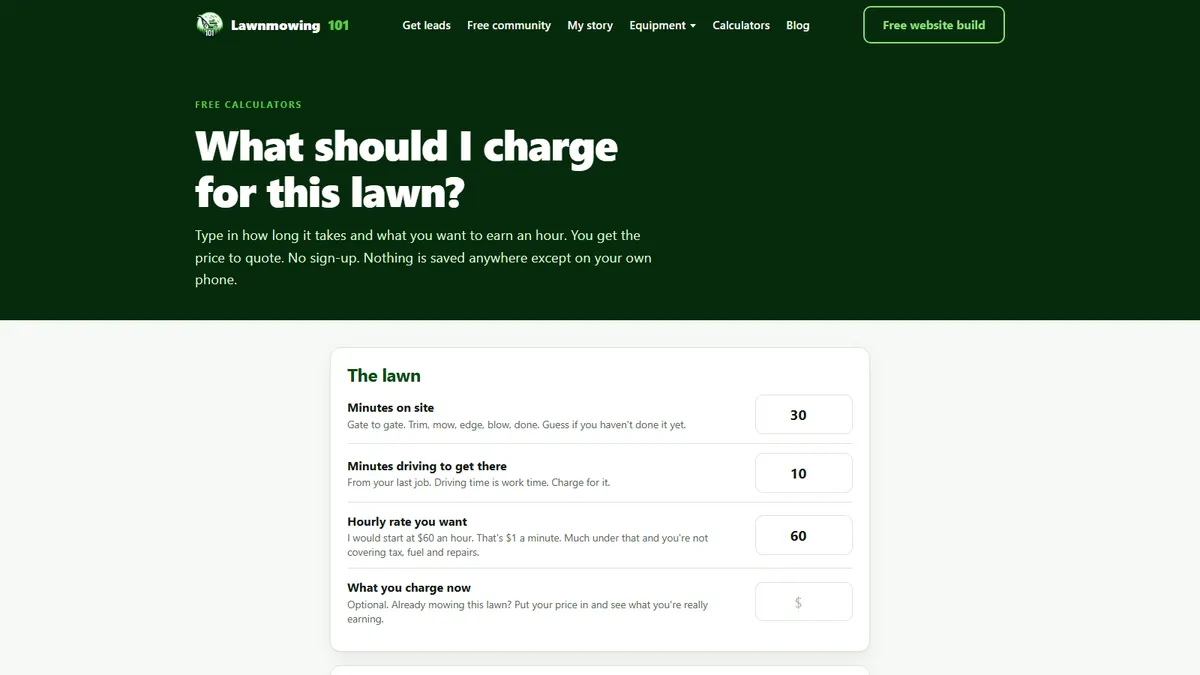
Then there is the price itself. I built two free calculators on this site for exactly that. You type in how long the lawn takes and what you want to earn an hour, and the lawn price calculator tells you what to quote. The capacity calculator shows how many lawns you can hold before your days get too long. No sign-up, and nothing is saved anywhere except your own phone.
More: How to quote on lawns, the complete guide
7. Texting customers
Price: free. It is the messages app already on your phone.
Most of my customer contact is text. Quote follow-ups, “running late”, “rain today, I will be there Thursday”, “all done, here are the bank details”, and the review request after the first mow. You do not need an app for any of that. You need the right words, saved so you are not typing them from scratch in the van.
The one text I do not send by hand any more is the review ask. Review Robot sends it for me, one past customer a night, from my own phone.
Save your common texts as keyboard shortcuts on your phone, or keep them in a note you can copy from. The exact texts I send are on the blog, and there are more in the community.
More: Lawn care text message templates: the nine texts I actually send
8. Getting found: Google and your website
Every app above helps you run the lawns you already have. None of them gets you new ones. For that, two things matter more than anything on your phone.
Your Google Business Profile. It is free, and it is the number one way homeowners find a local lawn business. Google retired the separate Business Profile app in 2022, so you now manage it straight from Google Maps or Google Search on your phone. My own listing brings in two to three leads a week, all year round.
A website that makes the phone ring. This one is mine, so weigh that. I build lawn care websites for $59 USD a month, and I build yours first for free. If you do not love it, you owe nothing. If you keep it, that covers the site, setting up or fixing your Google Business Profile, a lead capture chat, a quote form, your own domain and email, and a dashboard that shows your calls and quote requests. That dashboard is the one business app I check every day.
More: Best lawn care website builders and Google Business Profile for lawn care
Side by side
| Job | App | Price (USD) |
|---|---|---|
| Scheduling | Google Calendar | Free |
| Who owes what | Google Sheets | Free |
| Invoicing | Invoiless or Zoho Invoice | Lifetime plan, or free |
| Accounting | Zoho Books | Free under $50,000 turnover |
| Crew software | Jobber, QuoteIQ, ServiceM8 | From $29 a month (ServiceM8 has a free plan) |
| Quoting | Google Maps and my price calculator | Free |
| Texting | Your phone’s messages app | Free |
| Getting found | Google Business Profile | Free |
| Website and lead dashboard | Lawnmowing101 | Free build, $59 a month if you keep it |
Do today: open Google Calendar on your phone and put in next week’s lawns as repeating appointments. It takes 20 minutes, and it is the one app on this list every lawn guy should be using.
Frequently asked questions
What is the best free app for a lawn care business?
Google Calendar. It handles your round, it syncs to your phone, and it costs nothing. Add Google Sheets for payments and you have a working system for no money.
When should I pay for lawn care software?
When you have someone else mowing for you. Once more than one person needs the job list, a shared app like Jobber or QuoteIQ is worth the monthly fee. Before that, the free tools do the job.
Is there an app to measure a lawn?
Google Maps will do it. On a computer, right-click the lawn, choose “Measure distance”, and click around the edges to get the area. It is close enough to quote a price range before you drive out.
Do I need an app to take card payments?
Not to start. Most residential customers are happy to pay by bank transfer when you text the bank details. If you want card payments, most invoicing apps and all the lawn care software above can take them, for a fee on each payment.
What happens to my customer list if I lose my phone?
If it is in Google Calendar and Google Sheets, nothing. It is saved to your Google account, so you sign in on a new phone and it is all there. I learned that one the hard way with the Casio. Whatever you use, make sure there is a backup.

34 years mowing lawns. Built it up to five vans and 450 contracts, then cut back to a 20-hour week on the best lawns. My story.
Want more lawns?
I build lawn care websites first, free. You see it live before you pay a cent.