The 7pm Review Game: Checklist
One text a night. One review at a time. From lawnmowing101.com
Set up (once, about 20 minutes)
- Copy the Review Sheet: File, then Make a copy
- Delete the fake customers. Add every customer: address and mobile
- Get your review link: Google "my business" (logged in), click Ask for reviews, copy the link
- Put your business name, your review link and your name into the text in the sheet
- Set a repeating phone alarm for 7pm, Sunday to Thursday. Friday and Saturday off
Sunday to Thursday at 7pm
- Text the next customer on the list
- Type today's date in the Date column
- No review yet? Next customer the next night
When a review comes in
- Type the date in the Review column
- New profile under 10 reviews? No break, keep texting every night until you hit 10
- After that, stop and take your break: 10 to 25 reviews 7 days, 25 to 50 reviews 14 days, over 50 reviews 21 days
- Put the restart date in your calendar, then start again where you left off
Rules
- Yellow date (over 3 months old) means it's OK to text that customer again. Four texts a year at most
- Customer cancelling on good terms, like moving house? Ask them for a review
- Customer angry with you? Don't ask
- Never text the whole list at once. One a night
My reviews
| Review date | Reviews now | Break (0 / 7 / 14 / 21) | Restart on |
|---|---|---|---|
Full guide, video and free sheet: lawnmowing101.com/google-review-request-system
Most lawn guys don't ask for reviews regularly. That's good news for you. It means the bar is on the floor.
Gecko Lawns sits first in the map pack for "lawn mowing hamilton", in a town of over 150,000 people. 4.9 stars from 88 reviews. The next two listings were on 37 and 35 last time I looked.
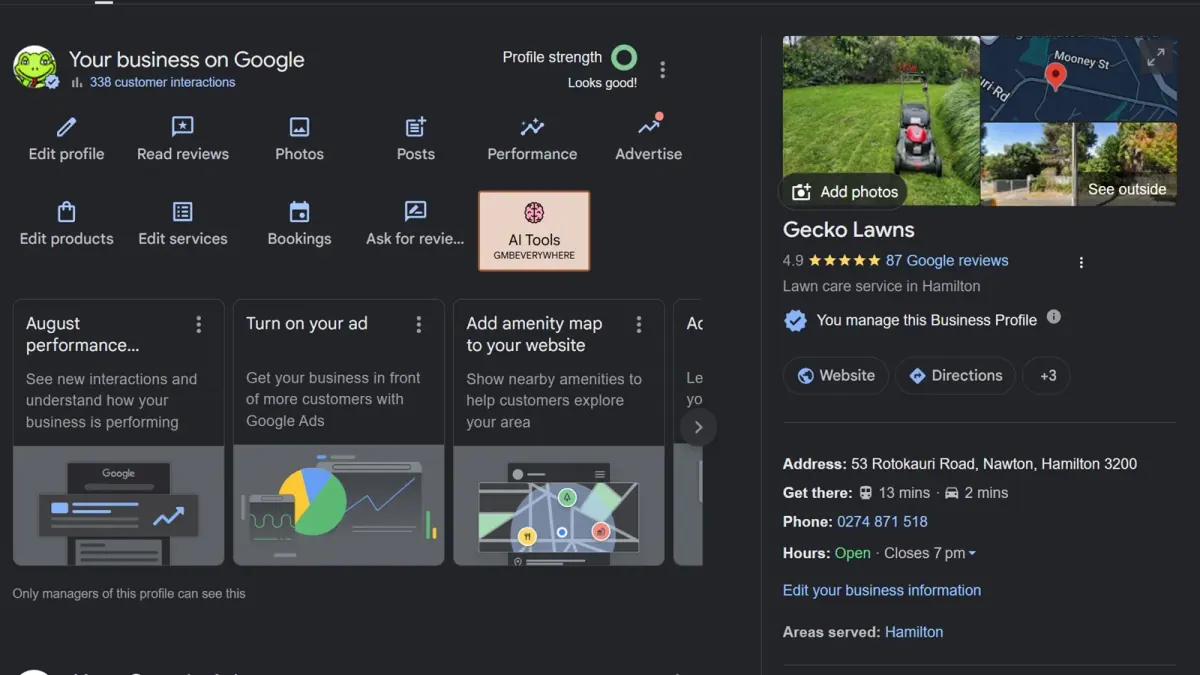
No software. No review company. A Google Sheet, a phone alarm and one text a night.
This post turns it into a game with seven levels. Tick each one off as you clear it. There's a pop quiz at the end. No pressure. (A little pressure.)
Grab the free sheet first. It downloads straight to your computer or phone. Open it in Excel, or upload it to Google Sheets.
The video up top walks through the whole thing in 7 minutes.
One page. Pick "Save as PDF" in the print window to keep a copy.
Build your list
⏱ Time to clear: 15 minutes
Open your copy of the sheet. Delete my fake customers. Type in every lawn you mow. Address in one column, mobile number in the next.
All of them. Not just the ones you like. You'll skip the grumpy ones later, not now.
We've got about 200 on our list.
Find your review link
⏱ Time to clear: 2 minutes
- Go to Google and make sure you're logged in with your business account.
- Type my business in the search box. Your Business Profile shows up.
- Click Ask for reviews.
- Copy the link.
Can't find it? Click the Google apps grid (the nine dots, top right) and look for Business Profile Manager.
The same screen gives you a QR code. You could print it on a card. I've never bothered. I just use the link.
Write your text
⏱ Time to clear: 1 minute. The easiest level. I've done it for you.
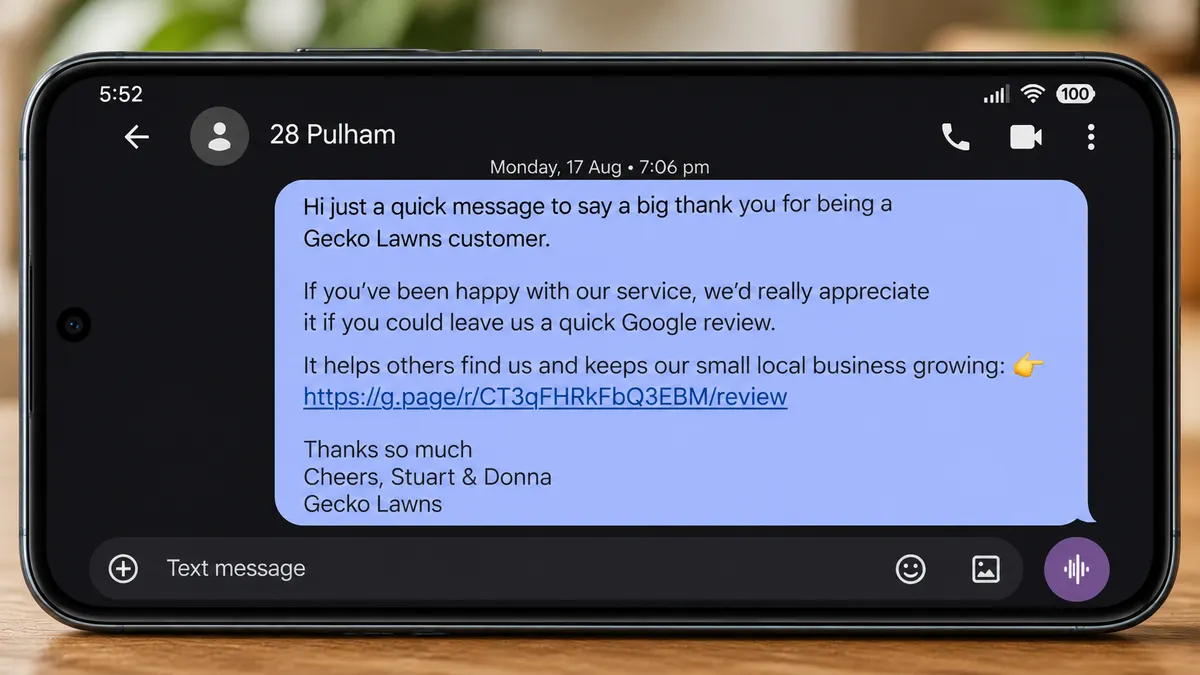
Here's the one in the sheet:
Swap in three things. Your business name, your link, your name. Done.
Set the 7pm alarm
⏱ Time to clear: 30 seconds
Set a repeating alarm on your phone for 7pm, Sunday to Thursday. Take Friday and Saturday off. When it goes off:
- Go to the next customer on the list.
- Copy their number and send them the text.
- Type today's date in the Date column next to their name.
That's it. Back to the couch.
No review? Next night, next customer. I don't usually get past about seven texts before a review turns up.
Win, then stop
This is the level everyone fails. When a review lands, you stop.
Type the review date in the Review column. Then put the phone down.
- Under 10 reviews: no break. Keep going.
- 10 to 25 reviews: wait 7 days.
- 25 to 50 reviews: wait 14 days.
- Over 50 reviews: wait 21 days. That's where I am.
Put it in your calendar like you'd book a lawn. Then forget about it. When the reminder comes up, go back to where you left off and start again.
About seven texts, one review, a couple of weeks off. Rinse and repeat.
Yellow means go
Keep this up and the dates start getting old. When a date is over three months old, the sheet turns it yellow.
Yellow means it's OK to text that customer again.
That's four texts a year, max. Nobody gets annoyed by four texts a year. And if they haven't left a review yet, one of them will probably catch them on a good day.
With 200 customers, we still haven't got through the list once.
The cancel ask
When a customer cancels, ask them for a review. Especially if they're moving house. They liked you. They're just leaving.
Find out why they're going first. If they're angry with you, you usually know already. Don't ask those ones.
If a cancelling customer leaves you a review, count it like any other. Start your break again.
How many reviews will you get?
Pick where you're at. This assumes your customers answer like mine: one text a night Sunday to Thursday, a review about every seven texts, then the break.
Most of your competitors get none.
Pop quiz
Six situations. Decide, then tap to check.
1. You got a review last night. Your 7pm alarm goes off. Do you text the next customer?
Depends how many you've got. Under 10 reviews: yes, keep going every night until you hit 10. After that, wait out your break: 7 days up to 25 reviews, 14 days up to 50, 21 days after that.
2. It's Friday night and your alarm goes off. Send one?
No. Friday and Saturday are off. Texting runs Sunday to Thursday.
3. You've got 30 customers and zero reviews. Text all 30 tonight to get it over with?
No. One a night. A steady trickle looks like a real business to Google. Thirty texts in one night looks like a campaign, and it burns through your list.
4. Mrs Patel just cancelled because she's moving to Tauranga. Ask for a review?
Yes. She's leaving happy. That's the perfect time to ask.
5. Dave cancelled after you flattened his roses, and he's still fuming. Ask for a review?
No. Fix what you can, then leave it. Don't hand an angry customer a link.
6. You texted Sue six weeks ago. No review. She's back up the list. Text her again?
Not yet. Wait until her date goes yellow at three months. Four texts a year is fine. More than that and you're the lawn guy who keeps texting.
Six out of six? You're ready. Set the alarm.
Frequently asked questions
How do I ask a customer for a Google review? By text, with your review link in the message. A thank you, your business name, the link, your name. Use the free sheet above. It has the text ready to go.
How often should I ask for Google reviews? One text a night, Sunday to Thursday. With a new profile, keep going every night until you have 10 reviews. After that, stop after each review: 7 days up to 25 reviews, 14 days up to 50, and 21 days after that. Don't text the same customer again until three months have passed.
Won't customers get annoyed? Not at four texts a year. That's the most anyone gets with this system, and most get far fewer. We have 200 customers and haven't got through the list once.
Where do I find my Google review link? Log into Google with your business account, search my business, and click Ask for reviews. Copy the link it gives you.
Do I need review software? No. Every one of my 88 reviews came from a text sent from my own phone. The sheet does the tracking. Your alarm does the reminding. If you'd rather not do it by hand, Review Robot sends the same text for you.
Should I ask customers who cancel? Yes, if they're leaving on good terms, like moving house. Not if they're leaving because they're unhappy with you.
One page. Pick "Save as PDF" in the print window to keep a copy.
Don't want to run the game by hand? Review Robot runs it for you. Load your customer list once. It texts one customer at 7pm on the nights you pick, from your own phone, takes a break when a review lands, and never asks anyone twice in 90 days. $29 USD a month. Needs an Android phone.
Next step
Tonight at 7pm, send one text. Just one.
Then come and tell us how long your first review took. I run a community of lawn care business owners and I'm in there every day. I also run a Facebook group of more than 180,000 lawn care businesses, so whatever you get stuck on, someone's been stuck on it before.
Join the community here (it's free).
For why reviews matter so much and what customers actually write about, read How to Get Google Reviews for Lawn Care.

34 years mowing lawns. Built it up to five vans and 450 contracts, then cut back to a 20-hour week on the best lawns. My story.
Want more lawns?
I build lawn care websites first, free. You see it live before you pay a cent.